
Roles in mambo EMM allow you to control exactly what each user can view, manage, change, or delete inside your team. This ensures secure, role-based access to devices, policies, enrolments, and team settings.
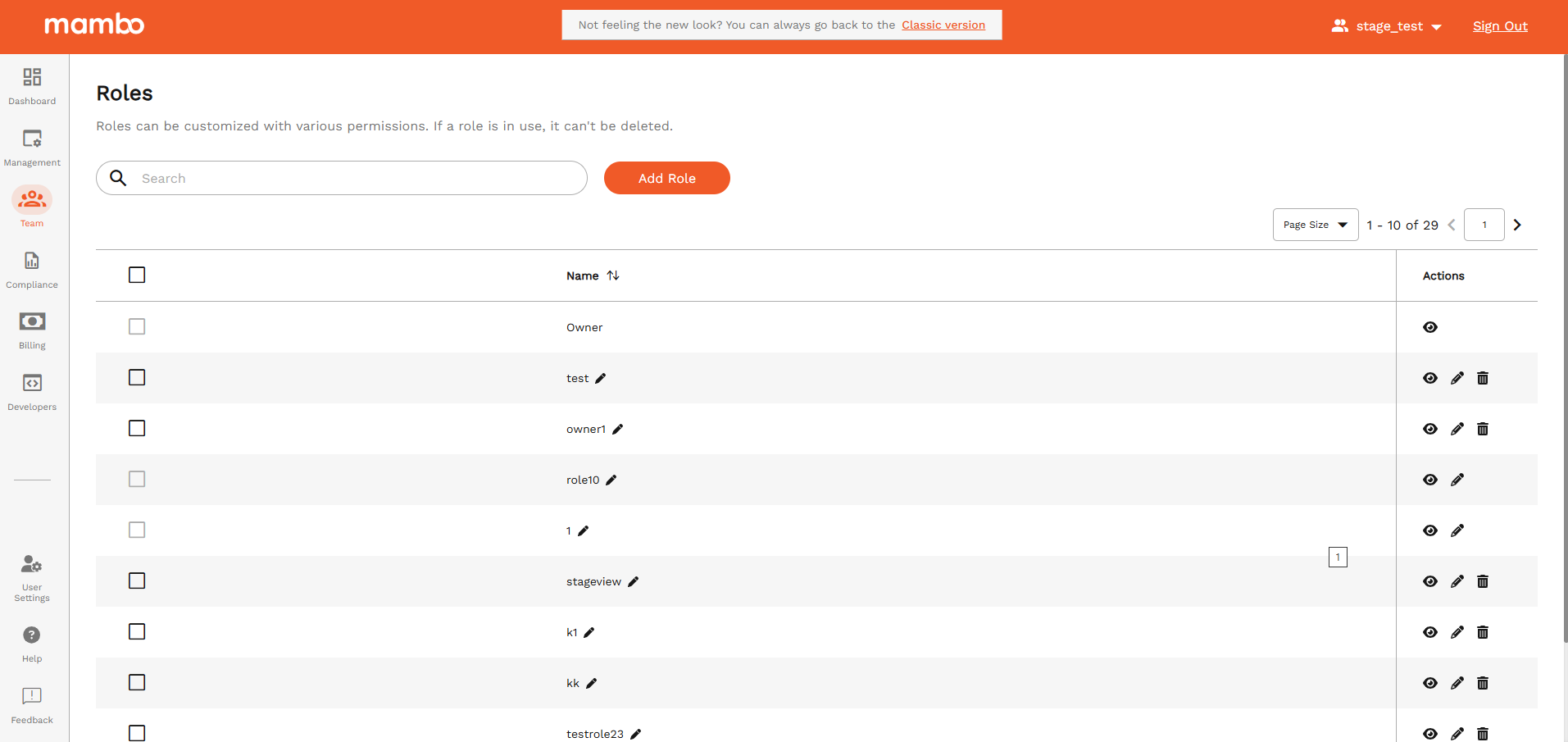
How to Add a New Role
- Go to Team → Roles in the mambo EMM console
- Click Add Role
- Enter:
- Name – e.g. IT Administrator, Support Agent, Auditor
- Choose permissions using the dropdowns and checkboxes below
- Click Save / Add Role
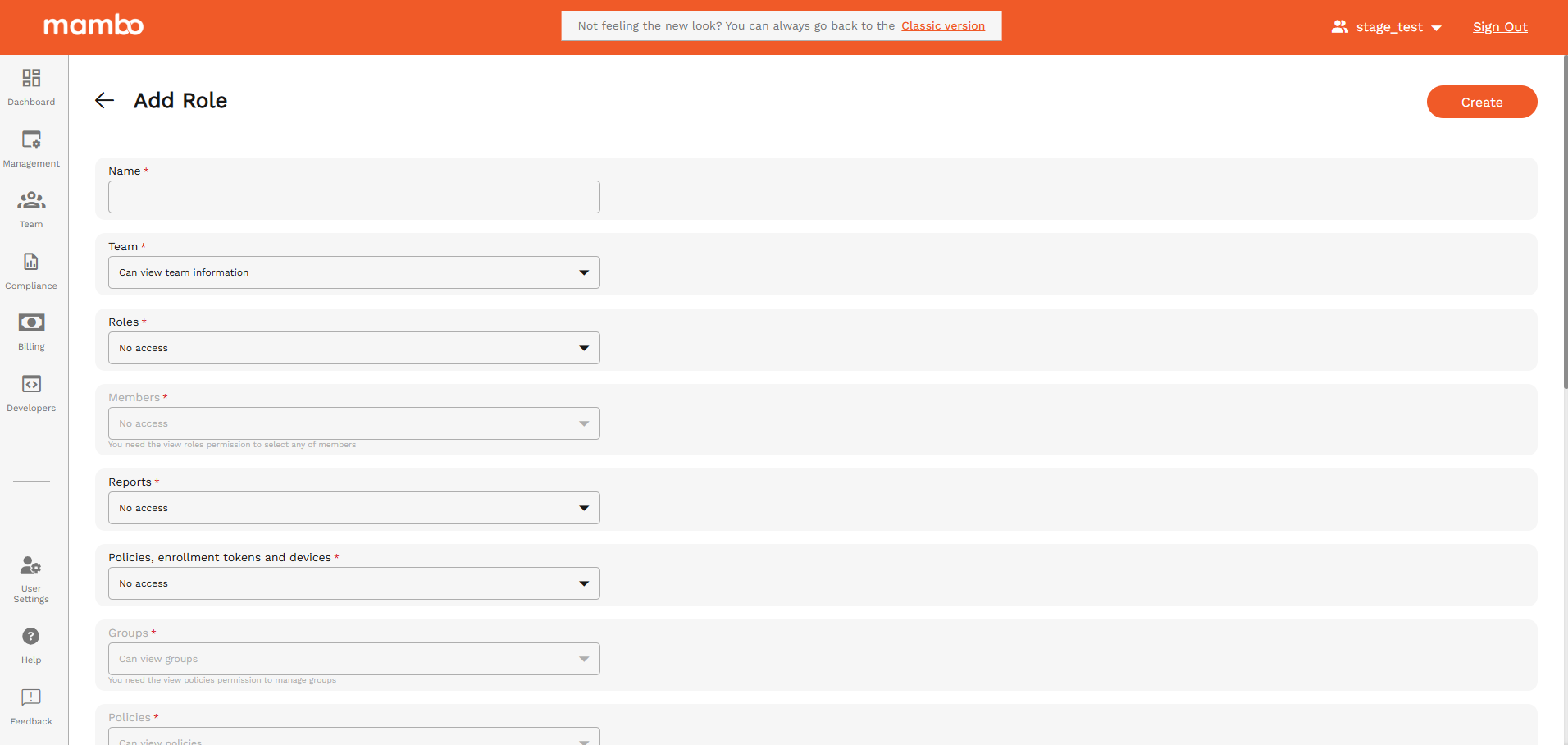
Permission that you can configure
🏢 Team
Controls access to team-level information and team security settings.
| Option | Description |
|---|---|
| Can view team information | User can see basic team details such as team name, ID and status. No changes allowed. |
| Can view and manage general team information | User can update basic team data like team name, slug, and preferences. |
| Can view, manage and change team security | User can manage security settings including 2FA enforcement, Android Enterprise binding and authentication methods. |
👥 Roles
Controls access to the Roles section itself.
| Option | Description |
|---|---|
| No access | User cannot view or access the Roles section. |
| Can view roles information | User can see existing roles but cannot edit or add them. |
| Can view and manage roles | User can create and edit roles but cannot delete them. |
| Can view, manage and delete roles | User has full control over role creation, editing, and deletion. |
⚠️ Only give full control to senior administrators.
👤 Members
Controls access to team members and SSO configurations.
| Option | Description |
|---|---|
| No access | User cannot see or manage team members. |
| Can view team members and SSO Configurations | User can view member list and SSO details but cannot edit anything. |
| Can view and manage team members and SSO Configurations | User can add members, edit details, and configure SSO, but cannot remove users. |
| Can view, manage and remove team members and SSO Configurations | Full control over team members including removal and SSO changes. |
📊 Reports
Controls access to reporting and exports.
| Option | Description |
|---|---|
| No access | User cannot view or generate any reports. |
| Can view reports | User can only view available reports. |
| Can view and generate reports | User can generate new reports and view them. |
| Can view, generate and delete reports | Full reporting access including deletion of reports. |
📱 Policies, Enrolment Tokens and Devices
Controls access to view the main device and policy areas.
| Option | Description |
|---|---|
| No access | User cannot see devices, enrolment tokens or policies. |
| Can view policies, enrolment tokens and devices | User can see devices, policies, and enrolment tokens but cannot modify them. |
🧑🤝🧑 Groups
Controls access to device groups.
| Option | Description |
|---|---|
| Can view groups | User can only view group information. |
| Can view and manage groups | User can edit groups and change their settings. |
| Can view, manage and delete groups | User can fully manage and remove groups. |
📜 Policies
Controls access to device policies.
| Option | Description |
|---|---|
| Can view policies | User can only view policies. |
| Can view and manage policies | User can edit and assign policies. |
| Can view, manage and delete policies | User can fully control policies including deletion. |
🔑 Enrolment Tokens
Controls device enrolment methods.
| Option | Description |
|---|---|
| Can view enrolment tokens | User can view tokens and QR codes but cannot create new ones. |
| Can view and manage enrolment tokens and zero-touch | User can create and edit tokens including Zero-Touch. |
| Can view, manage and delete enrolment tokens | Full control of enrolment tokens including deletion. |
📱 Device Commands
Controls which remote commands a user can issue to devices:
| Command | Description |
|---|---|
| Can lock devices | Lock a device instantly. |
| Can reset passwords | Force reset of device password. |
| Can reboot devices | Restart device remotely. |
| Can wipe/delete devices | Fully wipe the device (factory reset). |
| Can remote control devices | Remotely view and control the device. |
| Clear app data | Clear data for selected applications. |
| Can broadcast messages to devices | Send mass messages to devices. |
| Can manage eSIMs | Configure or remove eSIM profiles. |
| Can run ADB commands remotely | Run advanced Android shell commands (high risk). |
⚠️ You must also enable “View Devices” for these commands to work.
📦 Device Possession
Controls device ownership/possession state.
| Option | Description |
|---|---|
| No access | User cannot view possession status. |
| Can view a device's possession state | User can see current possession state of devices. |
| Can view and change device's possession state | User can modify device ownership or possession details. |
🔗 Webhooks
Controls notification/integration endpoints.
| Option | Description |
|---|---|
| No access | User has no access to webhooks. |
| Can view webhooks | User can only see configured webhooks. |
| Can view and manage webhooks | User can add/edit webhooks. |
| Can view, manage and delete webhooks | User has full webhook control including deletion. |
🔐 Access Tokens
Controls API and integration access tokens.
| Option | Description |
|---|---|
| No access | User cannot see or use access tokens. |
| Can view access tokens | User can view existing tokens but not create any. |
| Can view and create access tokens | User can create new tokens but cannot delete them. |
| Can view, create and delete access tokens | Full control over API tokens including deletion. |
💳 Billing
Controls subscription and plan details.
| Option | Description |
|---|---|
| No access | User cannot see any billing information. |
| Can view and update plan and billing information | User can see, change plans, and update payment info. |
Only give to finance or team owners.
Recommended Role Templates
| Role | Suggested Permissions |
|---|---|
| Team Owner | Full access to all sections |
| IT Administrator | Manage devices, policies, enrolments, groups |
| Support Agent | View devices, lock & message devices |
| Security Officer | Manage policies, wipe & lock |
| Auditor | View-only across the platform |
| Developer | Webhooks, Tokens, ADB |
Best Practices
✅ Follow the principle of least privilege
✅ Limit delete permissions
✅ Review role access regularly
✅ Remove unused roles
Summary
The Add Role feature allows you to precisely control:
- Who can manage devices and policies
- Who can enrol or wipe devices
- Who can access billing, security, and integrations
- Who can view reports and logs
Well-designed roles = secure + scalable + controlled management