
The Advanced Policy Component provides fine-grained control over system behavior, logging, authentication routing, key management, and application-level integrations.
Use this component when you need to configure advanced enterprise security, logging, and system integration behaviors.
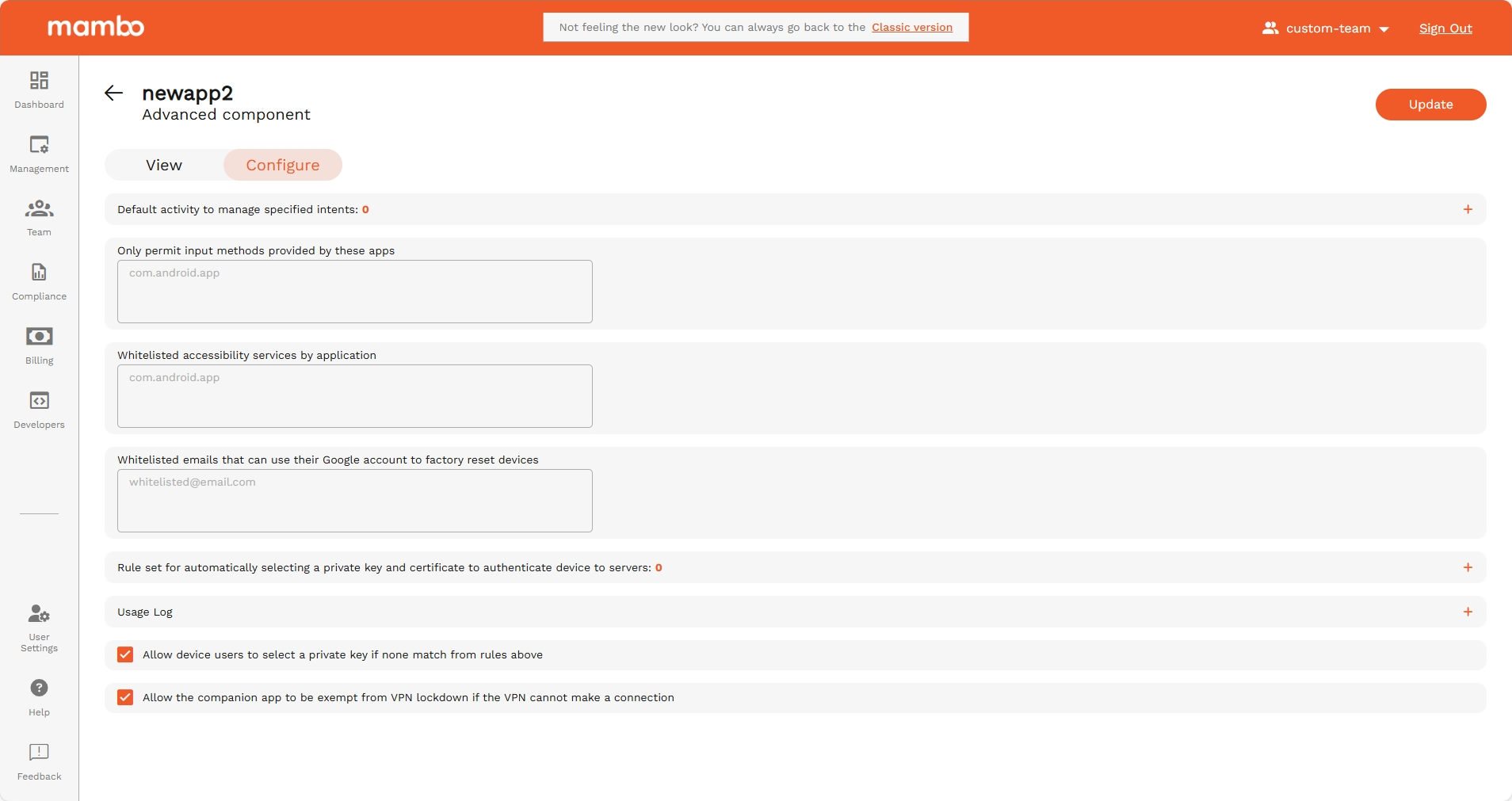
Persistent Preferred Activities
API reference: persistentPreferredActivities[]
Type: object (PersistentPreferredActivity)
Default intent handler activities.
A default activity for handling intents that match a particular intent filter.
Note: To set up a kiosk, use InstallType to KIOSK rather than use persistent preferred activities.
Persistent Preferred Activity
Fields
Permitted Input Methods
API reference: permittedInputMethods
Type: object (PackageNameList)
If present, only the input methods provided by packages in this list are permitted. If this field is present, but the list is empty, then only system input methods are permitted.
PackageNameList
Fields
| Field | API Reference | Type | Description |
|---|---|---|---|
| Only permit input methods provided by these apps | packageNames[] |
string | A list of package names. |
Permitted Accessibility Services
API reference: permittedAccessibilityServices
Type: object (PackageNameList)
Specifies permitted accessibility services. If the field is not set, any accessibility service can be used. If the field is set, only the accessibility services in this list and the system's built-in accessibility service can be used. In particular, if the field is set to empty, only the system's built-in accessibility servicess can be used. This can be set on fully managed devices and on work profiles. When applied to a work profile, this affects both the personal profile and the work profile.
PackageNameList
Fields
| Field | API Reference | Type | Description |
|---|---|---|---|
| Whitelisted accessibility services by application | packageNames[] |
string | A list of package names. |
Factory Reset Protection Admin Emails
API reference: frpAdminEmails[]
Type: string
Defines admin accounts allowed to unlock FRP-protected devices.
| Field | Type | Description |
|---|---|---|
| Whitelisted emails that can use their Google account to factory reset devices | string | Email addresses of device administrators for factory reset protection. When the device is factory reset, it will require one of these admins to log in with the Google account email and password to unlock the device. If no admins are specified, the device won't provide factory reset protection. |
Private Key Rules
API reference: choosePrivateKeyRules[]
Type: object (ChoosePrivateKeyRule)
Rules for determining apps' access to private keys. See ChoosePrivateKeyRule for details. This must be empty if any application has CERT_SELECTION delegation scope.
ChoosePrivateKeyRule
Controls apps' access to private keys. The rule determines which private key, if any, Android Device Policy grants to the specified app. Access is granted either when the app calls KeyChain.choosePrivateKeyAlias (or any overloads) to request a private key alias for a given URL, or for rules that are not URL-specific (that is, if urlPattern is not set, or set to the empty string or .\*) on Android 11 and above, directly so that the app can call KeyChain.getPrivateKey, without first having to call KeyChain.choosePrivateKeyAlias.
When an app calls KeyChain.choosePrivateKeyAlias if more than one choosePrivateKeyRules matches, the last matching rule defines which key alias to return.
choosePrivateKeyRule
Fields
| Field | API Reference | Type | Description |
|---|---|---|---|
| Outgoing URL request to match | urlPattern |
string | The URL pattern to match against the URL of the request. If not set or empty, it matches all URLs. This uses the regular expression syntax of java.util.regex.Pattern. |
| Key alias | privateKeyAlias |
string | The package names to which this rule applies. The signing key certificate fingerprint of the app is verified against the signing key certificate fingerprints provided by Play Store and ApplicationPolicy.signingKeyCerts . If no package names are specified, then the alias is provided to all apps that call KeyChain.choosePrivateKeyAlias or any overloads (but not without calling KeyChain.choosePrivateKeyAlias, even on Android 11 and above). Any app with the same Android UID as a package specified here will have access when they call KeyChain.choosePrivateKeyAlias. |
| Apps subject to this rule | packageNames[] |
string | The alias of the private key to be used. |
Usage Log
API reference: object (UsageLog)
Configuration of device activity logging.
Controls types of device activity logs collected from the device and reported via Pub/Sub notification.
Enabled Log Types
API reference: usageLog.enabledLogTypes
Type: enum
| Option | Enum | Description |
|---|---|---|
| Network Activity Logs | NETWORK_ACTIVITY_LOGS |
Enable logging of on-device security events, like when the device password is incorrectly entered or removable storage is mounted. See UsageLogEvent for a complete description of the logged security events. Supported for fully managed devices on Android 7 and above. Supported for company-owned devices with a work profile on Android 12 and above, on which only security events from the work profile are logged. Can be overridden by the application delegated scope SECURITY_LOGS |
| Security Logs | SECURITY_LOGS |
Enable logging of on-device network events, like DNS lookups and TCP connections. See UsageLogEvent for a complete description of the logged network events. Supported for fully managed devices on Android 8 and above. Supported for company-owned devices with a work profile on Android 12 and above, on which only network events from the work profile are logged. Can be overridden by the application delegated scope NETWORK_ACTIVITY_LOGS |
Upload Logs Over Cellular
API reference: usageLog.uploadOnCellularAllowed
Type: enum
Specifies which of the enabled log types can be uploaded over mobile data. By default logs are queued for upload when the device connects to WiFi.
| Option | Enum | Description |
|---|---|---|
| Network Activity Logs | NETWORK_ACTIVITY_LOGS |
Enable logging of on-device security events, like when the device password is incorrectly entered or removable storage is mounted. See UsageLogEvent for a complete description of the logged security events. Supported for fully managed devices on Android 7 and above. Supported for company-owned devices with a work profile on Android 12 and above, on which only security events from the work profile are logged. Can be overridden by the application delegated scope SECURITY_LOGS |
| Security Logs | SECURITY_LOGS |
Enable logging of on-device network events, like DNS lookups and TCP connections. See UsageLogEvent for a complete description of the logged network events. Supported for fully managed devices on Android 8 and above. Supported for company-owned devices with a work profile on Android 12 and above, on which only network events from the work profile are logged. Can be overridden by the application delegated scope NETWORK_ACTIVITY_LOGS |
Allow device users to select a private key if none match from rules above
API reference: privateKeySelectionEnabled
Type: boolean
Allows showing UI on a device for a user to choose a private key alias if there are no matching rules in ChoosePrivateKeyRules. For devices below Android P, setting this may leave enterprise keys vulnerable. This value will have no effect if any application has CERT_SELECTION delegation scope.
Allow the companion app to be exempt from VPN lockdown if the VPN cannot make a connection
API reference: allowEmmCompanionVpnExemption
Type: boolean
Allows EMM companion apps to bypass VPN restrictions.
Summary
Use the Advanced Policy Component to:
✔ Control advanced intent routing
✔ Restrict keyboards and accessibility services
✔ Configure private key routing rules
✔ Enable enterprise logging and upload policies
✔ Configure FRP admin recovery access
✔ Enable advanced authentication and VPN exemptions
This component is typically used in high-security enterprise deployments, regulated environments, and advanced device management scenarios.